Questions and answers
The questions people ask us most, with plain answers. If yours is not here, email us at hello@iconmosaicapp.com.
All questions
Do I need to jailbreak my iPhone?
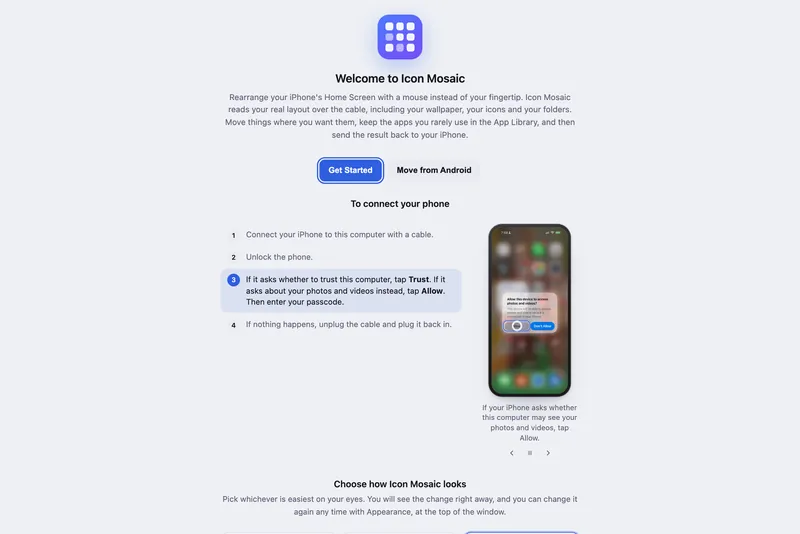
No. Icon Mosaic works with an ordinary iPhone, just as it comes from Apple, running the latest version of iOS. There is no jailbreak and nothing to install on your iPhone. It connects over the same cable you charge it with, the same way Finder does when it backs up your iPhone, and your iPhone asks you to trust your Mac before anything happens.
Could this break my iPhone?
Icon Mosaic changes where your icons, folders and widgets sit on your Home Screen. It deletes an app only when you ask it to and confirm, and it adds website and contact icons only after you approve them in Settings on your iPhone. It does not touch your photos, messages or settings. Before every change to your layout it saves a backup of the layout you had, and you can put that backup back on your phone at any time from the Layouts & Backups window. A deleted app cannot come back from a backup, which is why Icon Mosaic asks first.
What does Icon Mosaic need?
A Mac with macOS 12 or later, on Apple silicon or Intel, and an iPhone with a cable to connect it. It has been tested with iPhones running iOS 27, the current version of iOS.
Can it organize my iPhone apps by color?
Yes. Choose Arrange by color and Icon Mosaic sorts every app into a rainbow using the color you would call each icon. It can make one rainbow across all your pages, a rainbow on every page, a color for each page, or a folder for each color, in any color order you choose.
Can it put my apps in alphabetical order?
Yes. Choose Arrange from A to Z. Your folders, widgets and dock stay where they are, unless you ask for apps to come out of their folders first.
Can I give my apps custom icons?
Yes, on an iPhone with iOS 18 or later. Choose your apps, pick a rainbow or the colors you like, and Icon Mosaic makes each new icon through Apple's Shortcuts app, so it opens its app straight away. Custom icons do not show notification badges, so you may like to keep apps such as Messages and Mail as they are.
Can it hide apps so they only live in the App Library?
Yes. Drag an app, a folder or a whole selection onto Hidden Apps, and when you apply your changes, those apps leave your Home Screen. They stay on your iPhone, ready in the App Library and in Search. To bring one back, open Hidden Apps and drag it onto a page.
Can I copy my Android Home Screen to my new iPhone?
Yes, if it is a Google Pixel or Samsung Galaxy phone, or another Android phone like them. Icon Mosaic reads the Android phone over a USB cable or over Wi-Fi and lays out the same apps, folders, websites and favorite contacts on your iPhone, in the same order.
Can I change the color of my iPhone folders?
Not directly. iOS draws every Home Screen folder in frosted glass that takes its color from your wallpaper. You can fill folders with apps of one color, which Icon Mosaic does with A folder for each color, or type color emoji in folder names.
Does it work over Wi-Fi?
Yes, once your Mac and iPhone are set up to sync over Wi-Fi in Finder. Plug your phone in once, select it in Finder, turn on Show this iPhone when on Wi-Fi, and after that it can connect without the cable while both are on the same network.
Can I undo a change?
Yes. Undo and Redo work for every change to your layout, going back as many as 60 steps, and nothing changes on your iPhone until you press Apply to iPhone. After you apply, the backup Icon Mosaic saved first is in Layouts & Backups.
What information leaves my Mac?
Your Home Screen layout stays on your Mac. To group apps by category, Icon Mosaic looks up app names in Apple's public App Store directory. If you describe the folders you want, what you wrote, the names and categories of the apps involved, and the names of your folders with some of the apps in them, are sent to our server to work out the suggestion, and they are not stored. When you bring over an Android Home Screen, the names of apps Icon Mosaic cannot match by itself, and the names of the apps on your iPhone, are sent the same way. Website and contact icons are sent to our server to be signed, and they are not stored either.
Why is it not on the App Store?
Apps from the Mac App Store are not allowed to talk to an iPhone over the cable in the way Icon Mosaic needs to. Icon Mosaic is signed and checked by Apple through its notarization service, so it opens like any other Mac app you download from the web.
How much does it cost?
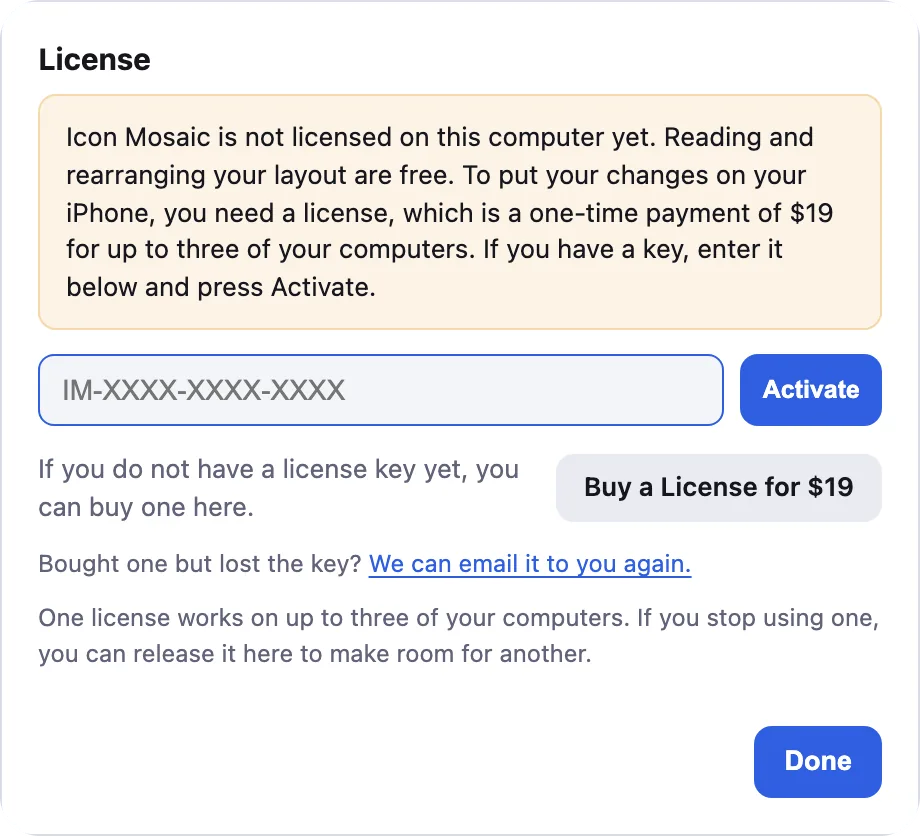
Icon Mosaic is free to download and try. A one-time $19 license, with no subscription, puts your new layout on your iPhone, and adds deleting apps, custom icons, website and contact icons, and folders described in your own words.
How do I enter my license key?
Open Icon Mosaic, click License, the key at the top right of the window, paste your key into the box, and then click Activate. Your key is shown on the screen after you pay, and we email you a copy too.
I lost my license key. How do I get it back?
Go to the find your license key page at iconmosaicapp.com/license and enter the email address you bought with. We will email your key to that address again.
How does the license work on more than one Mac?
One license can be active on up to three of your own computers at the same time. To move it, open Icon Mosaic on the old one, click License, and click Release this computer, then enter your key on the new computer and click Activate. If all three seats are in use, Icon Mosaic lists your computers so you can release one right there.
Can I get a refund?
Yes. If Icon Mosaic does not work for you, reply to your receipt within 30 days of buying and we will refund you.
What happens if an iOS update stops it from working?
Icon Mosaic relies on a part of iOS that Apple does not document, so a future update could change how it behaves. We test new versions of iOS and release updates when they are needed, and the app tells you when a new version is ready. If it does not work for you within 30 days of buying, email us and we will refund you.
Is there a version for Windows or iPad?
A version for Windows is coming to the Microsoft Store soon. There is no version for iPad yet. For now, Icon Mosaic runs on a Mac and works with your iPhone. If you would like to hear when there is news, email us at hello@iconmosaicapp.com.
Do it all on your Mac, in minutes.
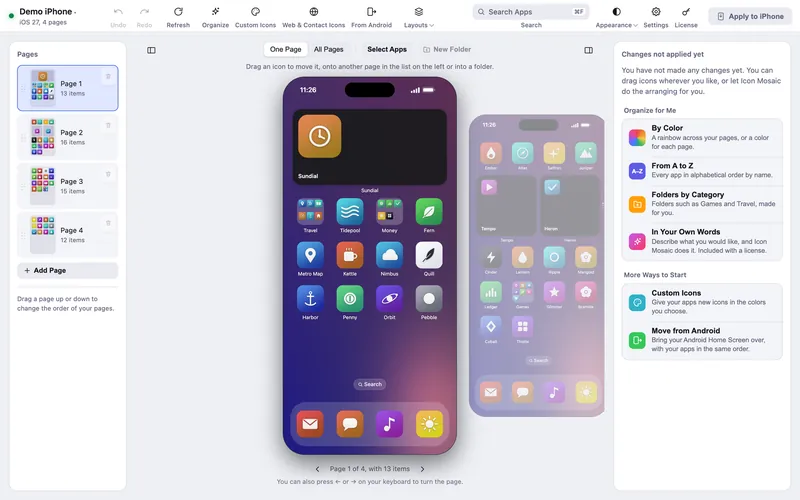
Icon Mosaic shows every page of your iPhone’s Home Screen side by side on your Mac, so you can drag apps anywhere, sort them by color or from A to Z, make folders, and send the result to your phone in one step.
Free to download and try. A one-time $19 license puts your new layout on your iPhone. A version for Windows is coming to the Microsoft Store soon.
Keep reading